Project 01 — Healthcare IxD
Age-Friendly Hearing-Aid Self-Fitting
Reducing interaction breakdowns among older users, caregivers, and audiologists
Role
UI/UX Designer · Cross-functional team
Type
Healthcare IxD / Aging-HCI
Date
May – Jul 2024
Project overview — a team-based redesign of self-fitting hearing-test interactions for older adults, May–July 2024.
Project Overview
This project addresses the redesign of a mobile self-fitting flow for a hearing-aid application, reframing hearing-test calibration as a home-based, user-administered task. The challenge extends beyond UI simplification: it involves hearing loss, varying digital fluency among older users, caregiver support, environmental noise, and a multi-step calibration sequence that must remain reliable outside clinical settings. As a team-based healthcare interaction design project, my contribution centered on researching, redesigning, and evaluating the self-fitting and hearing-test experience for older adults.
| Case dimension | Description |
|---|---|
| Health context | Hearing-aid self-fitting, transitioning a clinic-based calibration procedure into home, self-administered use |
| User group | Older adults with hearing impairment, spanning a wide range of smartphone familiarity |
| Stakeholders | Older user, caregiver, audiologist, hearing-aid hardware, mobile application |
| Main interaction risk | Breakdown during multi-step calibration due to cognitive load, unclear cues, or caregiver-mediated operation |
| Research contribution | Translating professional fitting procedures into a segmented, age-friendly digital interaction flow |
Academic Framing
Age-Friendly Hearing-Aid Self-Fitting examines how older adults experience a mobile self-fitting hearing-aid system, and how interaction design can reduce the breakdowns that occur when professional, clinic-based fitting procedures are translated into home, self-administered software. As part of a cross-functional team, I contributed to research, redesign, and evaluation of the hearing test and self-fitting flow within a commercial hearing-aid application. The project treats hearing-aid self-fitting as a multi-actor system rather than a single-user interface problem: older users, caregivers, audiologists, hardware, and software each shape whether self-fitting succeeds. Working from field-informed research, stakeholder mapping, and assisted usability testing, the redesign introduced age-friendly interaction principles, segmented support paths for differing levels of digital fluency, and clearer environmental and feedback cues. This case grounds my broader research interest in how older adults move from initial access to confident, supported, and continued use of health-related technologies.
Research Question
How can self-fitting hearing-aid software be redesigned to reduce interaction breakdowns for older adults with varying digital fluency, while preserving the support roles of caregivers and audiologists?
Why This Case Matters for Aging Digital Inclusion
Hearing-aid self-fitting sits at the intersection of health technology and everyday digital interaction: it requires older adults to complete a multi-step, feedback-dependent task with limited margin for error, often without professional supervision. Failures in this context are not purely cosmetic interface problems; they can mean abandoned devices, persistent caregiver dependency, or reduced confidence in using assistive technology altogether. Studying this case surfaces how cognitive, sensory, physical, and contextual constraints interact to produce specific, observable interaction breakdowns. It also illustrates how segmented, assisted, and adjustable interaction paths can support digital inclusion without assuming a single, uniform older-adult user. In this case, the hearing-aid workflow made barriers and facilitators visible at the level of interaction: smartphone familiarity, caregiver mediation, feedback ambiguity, environmental noise, and confidence all shaped whether older users could move from initial access to sustained use.
Background / Research
Why self-fitting becomes difficult for older users
Project materials indicate that traditional clinic-based hearing-aid fitting involves a long, multi-step procedure, which the self-fitting product aimed to compress into a shorter, home-based process. Internal research suggested that this compression introduces new interaction risks, particularly for older users with limited smartphone experience or slower response times. The board visualizes a user base concentrated in older age groups, alongside early indicators of data-entry errors, help-seeking behavior, and first-time-use dropout. Face-to-face hearing-test observation further reveals the procedural complexity that self-fitting software must simplify without compromising accuracy.
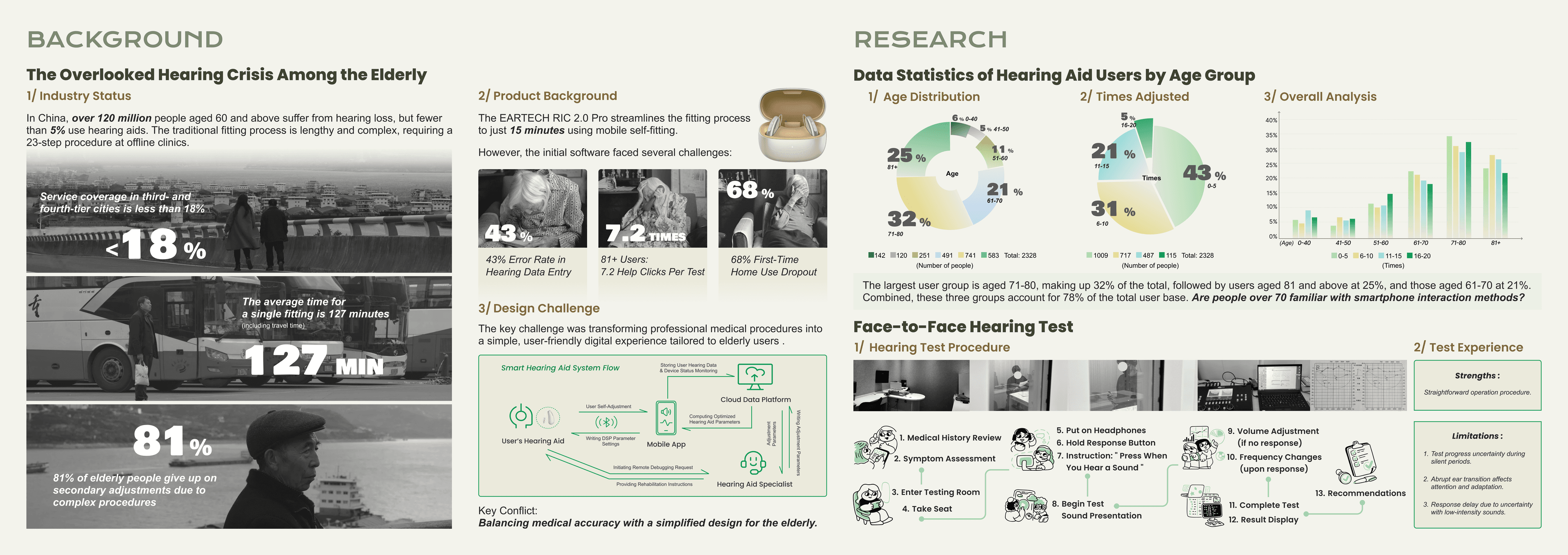
Background research situates self-fitting within a broader hearing-loss and hearing-aid adoption context for older adults.
| Evidence in board | Research implication |
|---|---|
| Clinic-based fitting involves many sequential steps | Self-fitting software must simplify procedure without losing necessary calibration steps |
| First-time users may struggle with home self-fitting | Onboarding and tutorial support are critical for initial adoption |
| Age distribution shows a large share of users aged 70+ | Design must account for varied smartphone familiarity within this group, not a uniform skill level |
| Help clicks, data-entry errors, and dropout appear in early software | Indicates points of cognitive and procedural breakdown in the original flow |
| Face-to-face hearing test has timing and response limitations | Clinic procedure itself sets a baseline complexity that self-fitting must address, not exceed |
Stakeholder System
Self-fitting as a five-role interaction system
The self-fitting experience is not contained within a single user's interaction with an app. Caregivers, audiologists, the mobile application, and the hearing aid itself each mediate part of the older user's experience, across first-time use, adaptation, support, and long-term use. Breakdowns can occur not only within the interface, but between these actors — for example, when a caregiver's operation does not match the user's actual hearing response. This stakeholder-aware framing aligns directly with digital-inclusion research that treats technology adoption as a relational, not purely individual, process.
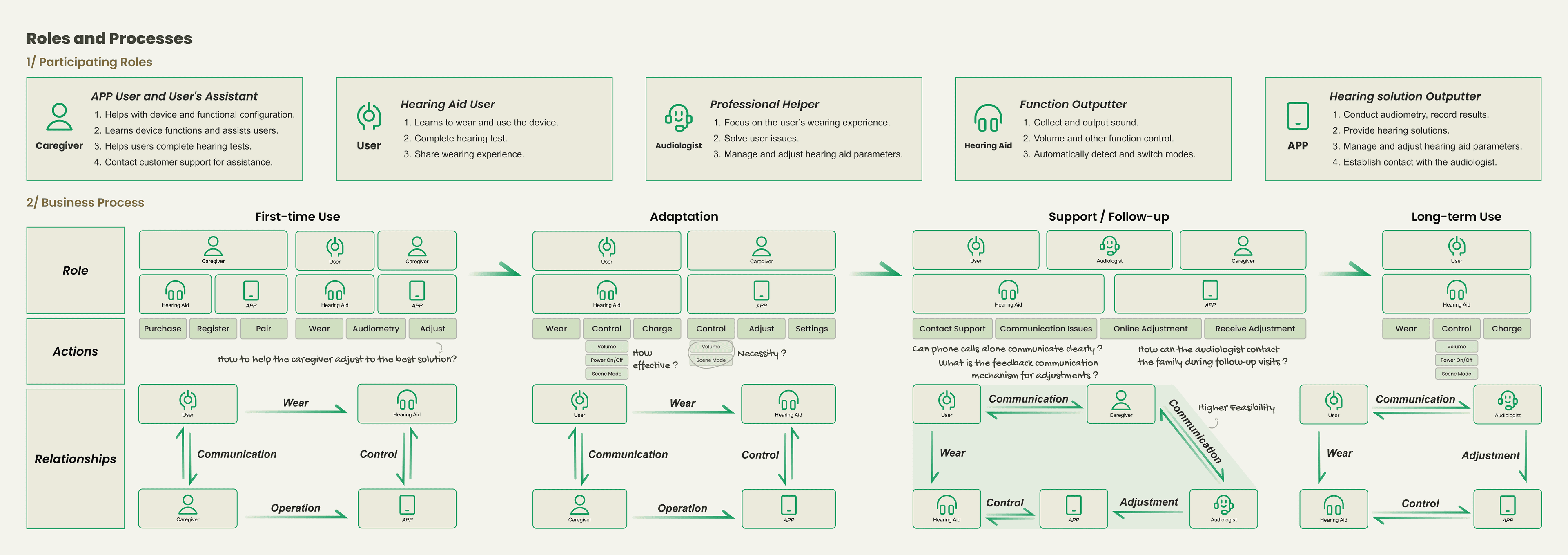
Mapping participating roles and business processes across first-time use, adaptation, support, and long-term use.
| Actor | Role in system | Possible breakdown |
|---|---|---|
| Older user | Wears the device, completes the hearing test, shares wearing experience | Misjudging or miscommunicating their own hearing response |
| Caregiver | Assists with device setup, functional configuration, and ongoing support | Acting as a communication bottleneck between user and app/audiologist |
| Audiologist | Conducts audiometry, provides hearing solutions, manages remote adjustments | Limited visibility into the user's real-world, in-context experience |
| Hearing aid | Collects and outputs sound, switches modes, detects environment | Ambiguous feedback (e.g., sound quality issues) that is hard to diagnose remotely |
| Mobile app | Manages parameters, connects user to audiologist, stores hearing data | Interface assumes a level of digital fluency the user may not have |
The design challenge was not simply to make the app easier, but to clarify responsibility across a user–caregiver–professional–device system.
Design Exploration
Translating age-friendly research into interaction principles
Building on observed breakdowns, the team translated age-friendly usability research into a set of practical interaction principles, illustrated through a representative older-adult persona. These principles favor concrete over abstract cues, single clicks over swipe gestures, familiar patterns over novel ones, and multimodal feedback over single-channel feedback. Hardware-level interaction, such as battery and connection indicators, was addressed using the same principles, recognizing that age-friendly design extends beyond the app screen. This stage represents the guideline-translation work that connects research findings to reusable design parameters.
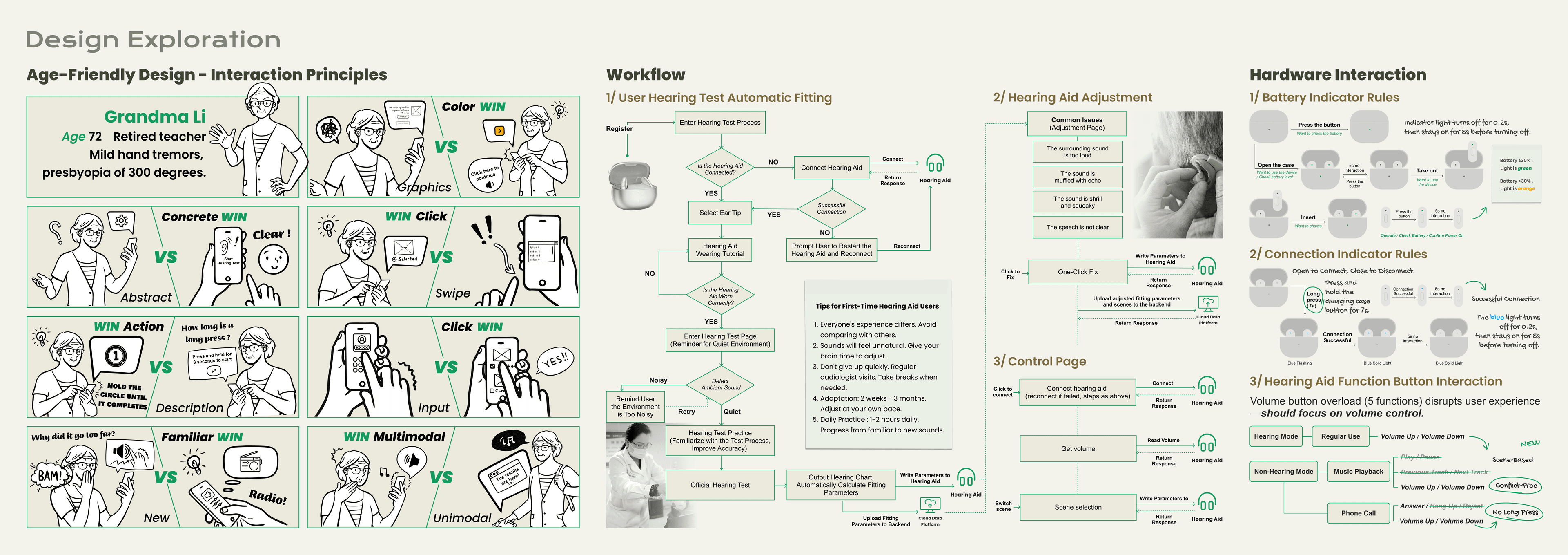
Age-friendly interaction principles applied across software and hardware touchpoints.
| Principle | Interaction implication |
|---|---|
| Concrete over abstract | Use clear, literal cues (e.g., "Start Hearing Test") instead of abstract icons or settings |
| Click over swipe | Prefer single-tap actions over gesture-based navigation |
| Action over description | Favor direct prompts ("Press when you hear a sound") over explanatory text |
| Familiar over new | Reuse conventions the user already recognizes (e.g., phone-call interactions) rather than introducing new patterns |
| Multimodal over unimodal | Combine visual, haptic, and audio feedback so a single missed cue does not break the flow |
| Reduce hardware overload | Simplify overloaded physical controls (e.g., a single volume button) to reduce conflicting functions |
This section translates observed breakdowns into reusable age-friendly design parameters.
Software Interaction
From previous flow issues to assisted testing and final optimization
The original hearing-test flow assumed users could complete a multi-step process independently, with limited tolerance for hesitation or error. Assisted testing sessions indicated limitations in memory (recalling instructions), response timing, caregiver-led operation, and the clarity of in-flow feedback. In response, the redesign restructured the flow to compress steps, introduce a one-time noise check, and separate users by smartphone familiarity and support condition. This stage represents the bridge between problem discovery and the final, segmented interaction redesign.
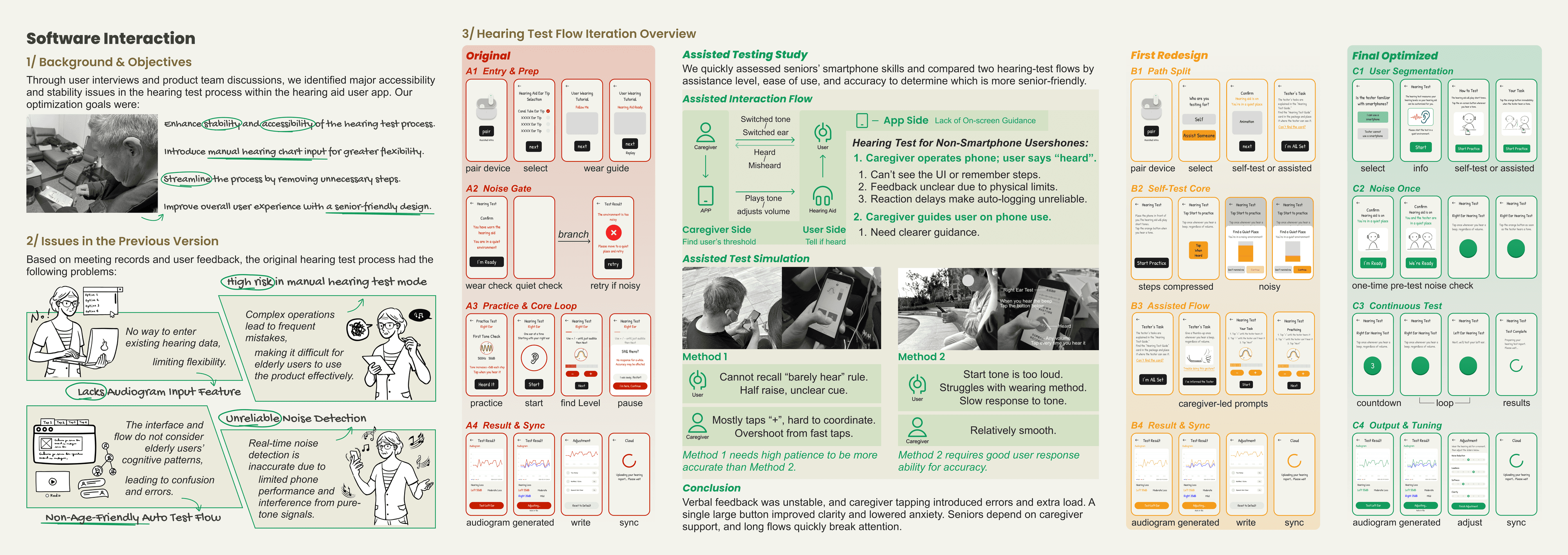
Iterating from the original flow, through an assisted-testing study, to a first redesign and final optimized version.
| Observed breakdown | Redesign response |
|---|---|
| No way to enter existing hearing data | Added manual hearing-chart input for greater flexibility |
| Complex operations caused frequent mistakes | Streamlined the process and removed unnecessary steps |
| Auto-test flow was not age-friendly | Introduced senior-friendly design patterns and clearer task segmentation |
| Noise detection was unreliable | Consolidated noise checking into a single, clearer pre-test step |
| Caregiver-led operation introduced timing and communication errors | Clarified caregiver-side guidance and on-screen instructions |
| Long flows broke attention | Compressed steps and introduced a continuous, lower-friction test loop |
The redesign did not assume one average older user. It separated flows by smartphone familiarity and support condition.
Final UI Flow / Outcomes
Segmented self-fitting flow for different support conditions
The final design separates users who are familiar with smartphones from those who are not, offering an assisted path with tester- or caregiver-led options where needed. Sound-field level detection was introduced to address environmental noise during testing, and on-screen guidance was clarified for both independent and assisted use. Outcome signals reported by the project team are described here cautiously, as aggregated, product-development indicators rather than findings from an independent or peer-reviewed study.
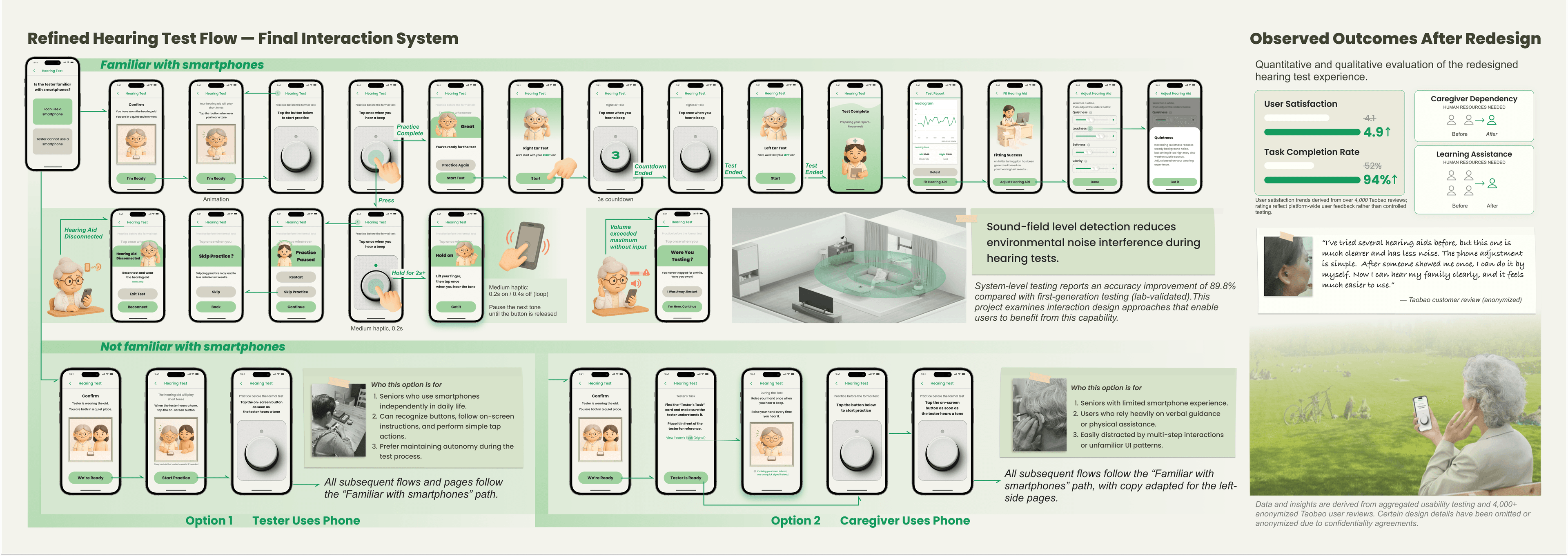
Final interaction system, segmented by smartphone familiarity and support condition, with sound-field detection for noise management.
| User condition | Design path | Why it matters |
|---|---|---|
| Familiar with smartphones | Independent self-test flow with standard on-screen guidance | Preserves autonomy for users who can operate the app directly |
| Not familiar with smartphones | Assisted flow with simplified, tester-guided prompts | Reduces reliance on memory and multi-step independent operation |
| Tester uses phone | Tester operates the app while the user completes the hearing test | Clarifies division of responsibility during assisted testing |
| Caregiver uses phone | Caregiver operates the app on the user's behalf | Supports users who depend on a caregiver for digital tasks |
| Noisy environment | One-time pre-test noise check before proceeding | Reduces unreliable readings caused by ambient noise |
| Adjustment output | Audiogram generated, written, and synced automatically | Reduces manual steps and potential data-entry error |
Outcome Signals
| Outcome signal | Safe interpretation |
|---|---|
| User satisfaction improved | Aggregated internal feedback suggested higher satisfaction after redesign |
| Task completion improved | Product-development indicators suggested improved completion |
| Caregiver dependency reduced | Assisted modes clarified, rather than eliminated, support roles |
| Sound-field detection supported more reliable self-testing conditions | Treated as product-development evidence, not clinical validation |
| User quote / review | Used only as anonymized, qualitative feedback, not as outcome proof |
Aggregated internal feedback indicated improved task completion, higher user satisfaction, and more reliable self-testing after the redesign. Exact metrics and raw data are omitted due to commercial confidentiality.
Findings reflect internal product evaluation, not an independent or peer-reviewed study.
Raw data, internal product metrics, and implementation details are omitted or presented in aggregated form due to commercial confidentiality.
Research Takeaway
This project showed that interaction breakdowns in hearing-aid self-fitting are not caused by interface complexity alone. They emerge from the interaction of hearing loss, varying digital fluency, working-memory load during multi-step calibration, caregiver mediation, environmental noise, and trust in ambiguous feedback. Addressing these breakdowns required more than visual simplification: it required segmenting support by digital fluency, clarifying responsibility across user, caregiver, and audiologist, and introducing adjustable feedback mechanisms such as sound-field detection. These segmented and assisted modes functioned as a negotiated form of adaptive support, rather than a single fixed interface. This project became the applied foundation for my broader research interest in adaptive usability and aging digital inclusion — specifically, how interaction design can support older adults' progression from initial access to confident, supported, and continued use of health-related technologies.
From Project to Research Direction
This project aligns with research interest in how older adults progress from access to use to embracement of digital health technologies. It treats the caregiver, audiologist, and device as part of a single interaction system — a stakeholder-aware framing of technology adoption consistent with digital-inclusion research. The redesign's segmentation by digital fluency and support condition reflects an adjustable, rather than one-size-fits-all, approach to usability, supporting confidence, autonomy, and continued use. This case also helped me understand barriers and facilitators as interaction-level phenomena: the same technology can support or block continued use depending on feedback clarity, caregiver mediation, environmental noise, and the user's confidence in the system. As an applied case, it offers concrete examples of interaction breakdowns and design responses that could inform thesis-level research on adaptive usability in aging digital inclusion.
Raw data, internal product metrics, and implementation details are omitted or presented in aggregated form due to commercial confidentiality.